




Step-by-Step Guide to
Generating Your First Pay Stub with SecurePayStubs
Creating Your First Free Pay Stub: A Quick Overview
-by Alexia Zepeda | SecurePayStubs
5-min read
- Creating a pay stub is quick and simple, even for first-time users without payroll experience.
- Accurate pay stubs provide proof of income and help businesses maintain organized payroll and financial records.
- You'll need basic information such as employee and employer details, pay rate, pay period, payday, earnings, and deductions.
- Additional earnings and deductions can be included, such as overtime, bonuses, commissions, taxes, benefits, and retirement contributions.
- Reviewing the pay stub before generating it helps ensure names, dates, earnings, and deductions are accurate.
- SecurePayStubs lets users generate and download professional pay stubs quickly without requiring a traditional payroll system.
- Keeping consistent and accurate pay stub records can help small businesses and contractors stay organized and meet applicable requirements.
Creating a pay stub for the first time may seem complicated, but it’s quick and easy. For small business owners and independent contractors, accurate pay stubs are essential for staying compliant, tracking finances, and providing proof of income when needed.
With SecurePayStubs, you can generate a professional, compliant pay stub in just a few minutes—no payroll system or prior experience required.
Table of Contents
Why Are Pay Stubs Important?
Before you start, it’s important to understand why pay stubs matter:
- Proof of Income for loans, rentals, and tax filings
- Transparency for employees and contractors
- Accurate record-keeping for your business
- Tax Compliance with federal and state requirements
What Information Will You Need Before You Start?
To create your pay stub smoothly, have the following information ready:
| Required Details | Description |
|---|---|
| Information about employees | Full name, address, and employment details |
| Information about the employer | Business name and contact details |
| Pay Details | Salary, hourly rate, or contract earnings |
| Pay Period | Start date and end date |
| Pay Date | The date payment is issued |
| Deductions | Taxes, benefits, or other withholdings |
Step-by-Step Guide to Create Your First Pay Stub
Step 1: Enter Basic Information

Start by filling in the employee and employer details:
- Employee name and address
- Employer/business name
- Work location
This ensures your pay stub looks professional and compliant.
Step 2: Add Salary Information

Fill out the Salary Information section with:
- Annual wage or hourly wage
- Pay schedule type (for example: weekly, biweekly, monthly, etc.)
- Pay period dates
- Payday
Once you enter the required information, the system will automatically calculate your gross earnings.
Step 3: Add Additional Earnings

If applicable, add extra income such as:
- Overtime
- Bonuses
- Tips
- Commissions
With the custom earnings option, you can add other types of income specific to your business or employee needs.
You may easily add these details by click the “Add Additional Earnings” button.
Step 4: Add Deductions

Now add necessary deductions, such as:
| Types of Deduction | Examples |
|---|---|
| Federal Taxes | Income tax withholding |
| State Taxes | Based on the employee's work location |
| FICA Taxes | Medicare and Social Security |
| Other Deductions | Health insurance and contributions to retirement plans |
You may easily add these details by clicking the “Add Deduction” button. You can also add your own deductions with the custom deduction option to match certain perks, reimbursements, or withholdings that are specific to your business.
Step 5: Review Your Pay Stub

Before finalizing:
- Review all entries carefully
- Verify calculations
- Make sure the names, dates, and amounts are right
You can preview your pay stub before downloading it with SecurePayStubs.
Step 6: Download and Use Your Pay Stub

When everything looks good:
- Generate your pay stub
- Download it instantly
- Share or store it for records
You now have a professional, compliant pay stub ready to use.
Start Creating Professional Pay Stubs in Minutes
Make Your First Professional Pay Stub in a Few Minutes Fast, accurate,
and compliant—no experience required.
Pro Tips for First-Time Users
- Always ensure tax deductions are accurate.
- Keep records of all generated pay stubs
- Use consistent pay schedules for better tracking
- Generate pay stubs regularly to avoid last-minute stress.
Common Mistakes to Avoid
- Entering incorrect pay period dates
- Forgetting to add extra earnings
- Miscalculating deductions
- Skipping the preview step
Why Choose SecurePayStubs?
- Fast and easy pay stub generation
- No payroll system required
- Designed for small business owners
- Accurate calculations and compliance support
- Accessible anytime, anywhere
Get Your First Pay Stub for Free
Getting started with SecurePayStubs is even better because your first pay stub is free.
Here’s how to get it:
- Follow the steps above to create your pay stub.
- Proceed the checkout or download section.
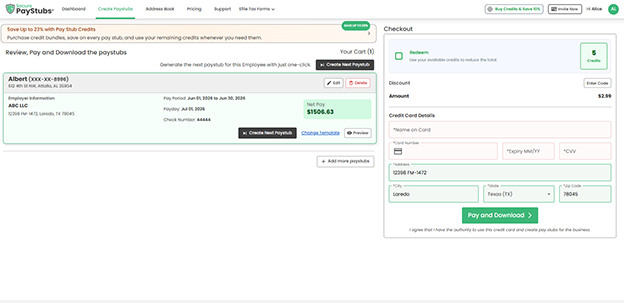
- Use the code FIRSTSTUB to get a discount as a first-time user.
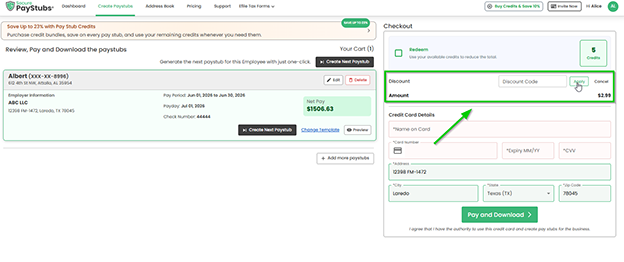
- Your total will be reduced to $0 for your first pay stub


This is a great way to try the platform before using it regularly and see how easy it is to make pay stubs that follow the rules.
Don’t Miss Your Free First Pay Stub
Create, download, and use a professional pay stub at zero cost—quick, simple, and compliant.
Final Thoughts
Creating your first pay stub doesn’t have to be difficult. Even if you’ve never done it before, you can create accurate and professional pay stubs in minutes using SecurePayStubs.
Following this step-by-step method can help you stay organized and compliant while also saving you time.
This article was last updated on July 02, 2026.